
Last update: Aug 18, 2020
In this chapter, we will learn:
- Identifiers and keywords
- Primitive data types
- Arithmetic and Boolean Operations
- Method invocation
1. About Lesson2
Let’s create a new Java project “lesson2”. All the examples from this lesson are developed under project “lesson2”
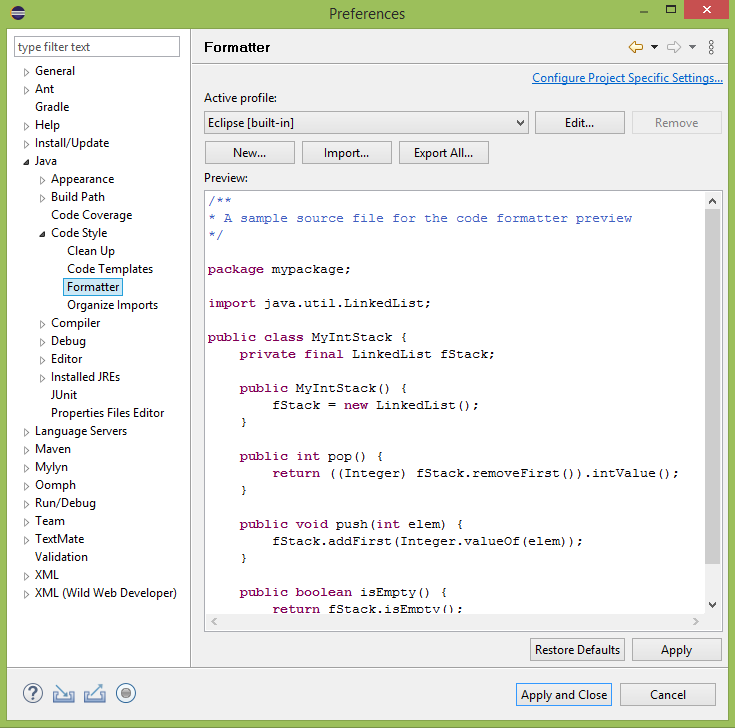
We have learned in Lesson 1 that the Eclipse IDE can help us automatically adjust the format of the source code. Simply press Ctrl + Shift + F to format the Java source code currently opened in the Editor. If you like to see more details about what the format template looks like, you can follow the following steps: from Eclipse main menu, Windows –> Preferences –> Java (from the left navigation column in the popup window) –> Code style –> Formatter.
2. Identifiers and Keywords
Now, let’s create a new Java class named “IdentifierDemo”. In this class, we can find there are names for the package (sub-directory), class, method, arguments, variables, and methods. These are identifiers to uniquely identify the elements in the program. A identifier can be made up of alphanumeric and “_” (underscore). The first character must be either a letter or “_”. Digits are valid character to be a part of an identifier, but not allowed to be the first character. Spaces and symbols other than “_” are not allowed in an identifier.
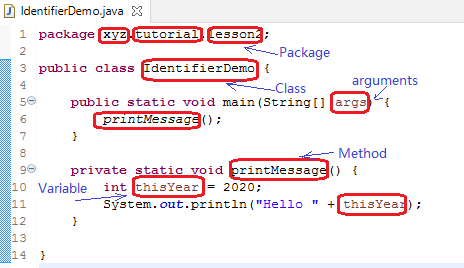
In the program above, “package”, “public”, “class”, “int”, “static”, “void” are keywords in the Java language, which have been assigned the specific meaning and syntax rules. Keywords are reserved for the Java language. A programmer cannot use the reserved keywords as identifiers. Other than the keywords in the program, the primitive date types “float”, “double”, “short”, “long”, “boolean”; control commands “while”, “do”, “for”, “if”, “else”, “switch”, “case”, “break”, “continue”, “try”, “catch” are all reserved for Java. You may not remember all of them at this moment. We will learn all these in future lessons of this tutorial series.
3. Primitive Data Type
Java defines 8 primitive types. Once a variable is declared as one type, only compatible types can be assigned to this variable. The type cannot be changed at the application run-time.
| Primitive Type | Description | Default Value |
| byte | A byte, 8-bit in binary. Date range from -128 to +127 | 0 |
| short | 16-bit signed integer. (signed: the value could be either positive or negative). Data range: -32768 to +32767 | 0 |
| int | 32-bit signed integer. | 0 |
| long | 64-bit signed or unsigned (since Java 8) | 0 |
| float | 32-bit floating point (with decimal point) | 0.0f |
| double | 64-bit floating point | 0.0d |
| boolean | Only 2 possible values: true, false | false |
| char | Single 16-bit Unicode character | ‘\u0000’ |
Notes to whom have never learned binary: You don’t have to dig into the details about the data range. Once you learn more about binary, these data range will be much easier to understand. New learners must understand the meaning of these types, not the binary numbers and their operations.
Basically, short, int, and long are integers. float and double are numbers with decimal points. If we don’t have to consider data overflow or program optimization, then the “int” and “float” fit most cases. However, a programmer has to understand all the primitive data types and concepts of the binary operations in advanced programming.
Let’s see a class “Car”
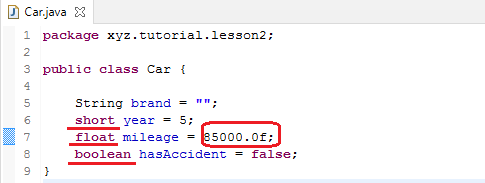
Like that in many programming languages, in the Car class, the “=” sign means the value assignment. It assigns the right-side value to the left-side identifier.
In this class, there are 3 primitive types presented.
“year” represents the age of the car. It is declared as a “short” type. From the primitive data type table, we know that the short type is a 16-bit integer, the maximum positive value is 32767. A car cannot be older than 32767 years, so “short” type is good enough in this case. We are free to replace “short” with “int”. The “int” type is 32-bit. Since the maximum value of “int” type is huge (4.3 billion or so), No car can be the same age of the Earth. It is up to you to choose the type.
“float” type mean a value with decimal point. “85000.0” is a good example. However, if we simply put a number like “85000.0”, Java would consider it has a type “double”. Since “double” type is 64-bit, much longer than 32-bit “float” type. A “double” type data cannot be assigned to “float” type. That’s why we append “d” to tell Java compiler explicitly here the “85000.0” is a “float” type instead of “float”.
“boolean” type a pretty simple. It has 2 possible values “true” or “false” to represent the natural language “yes” or “no”.
4. Arithmetic Operations
The arithmetic operations are straightforward with several special forms and rules.
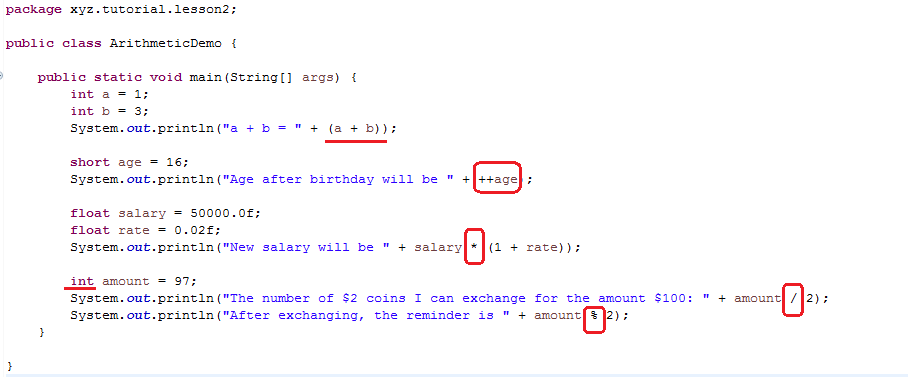
The ArithmeticDemo class shows addition, multiplication, and division.
Like the common arithmetic, (a + b) means it takes priority to evaluate the expression inside the brackets. You may try with and without the brackets to find the differences from the application output.
++age is a special form. The meaning is: age = age + 1; It increases the value of the variable by 1. We must differentiate the form of ++age and age++. Both increase the age by 1. If we have “++” at the left side, means the value of age increased by 1, then the result of age++ (already increased) is used by the application for print out. If the “++” is at the right side, means the value of age is used by the application first (not increased yet), and then increase by 1 without affecting the value already used by the app. In the later case, the printout to the console will be executed before the value change of age. Please try these two cases. It is an important to know the difference.
Multiplication uses “*” sign instead of regular “×”, which is not available from a standard keyboard.
“/” division is an interesting operation. If either the dividend or divisor are of “float” type, the result of the division will be of “float” type. If both dividend and divisor are of “int” type, the result of the division will be “int”.
“%” is called modulus or remainder operator. It returns the remainder of division.
5. Boolean Operations
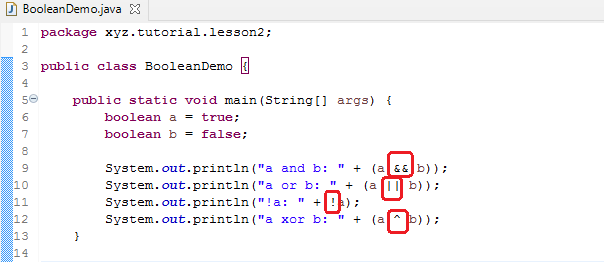
Boolean type has only 2 possible values: true, false. The regular logical operations are: AND (&&), OR (||), negation (!), and XOR (^).
AND: only 2 operands are true, then the result of AND operation (&&) is true.
OR: if one of the operand is true, then the result of OR operation (||) is true.
Negation: Negation of true is false. Negation of false is true.
XOR: Only if 2 operands are different, then the result of XOR is true.
| a | b | a && b | A || b | A ^ b |
| 0 | 0 | 0 | 0 | 0 |
| 0 | 1 | 0 | 1 | 1 |
| 1 | 0 | 0 | 1 | 1 |
| 1 | 1 | 1 | 1 | 0 |
Here is a simple example to demonstrate the logical operations.
6. Method Invocation
So far, we have seen some examples. Most examples have a main method() as the entry point of the application. If the application logic is simple enough, it can be just placed in the main() method. Otherwise, the logic should be distributed into methods of the same class, or even to other classes. Let’s revisit the IdentificationDemo.
public class IdentifierDemo {

	public static void main(String[] args) {
		printMessage();
	}

	private static void printMessage() {
		int thisYear = 2020;
		System.out.println("Hello " + thisYear);
	}

}
In this example, the business function it fulfilled is placed in the printMessage() method. Once the class is launched and main() method is automatically called, the printMessage() method is in turn called. Then the application business logic is executed. The methods can further call other methods.
Calling a method is not always as simple as this example. There are two concepts we haven’t covered in this lesson. (1) why the printMessage() method is static like main()? (2) How to pass parameters to a method. These 2 are commonly asked questions at this point. Write down your questions, and find answers in future lessons.
7. Primitive Type Conversion and Compatibility
The Primitive Data Type Table shows every type has a fixed length in bytes. The length is the actual storage space the data type takes for its storage. A shorter length data type is possible to be assigned to a longer length data type. That means, it is okay to assign an integer value to a double type variable or assign a float value to a double type variable. On the other hand, double type requires 64-byte storage space, it is impossible to be assigned to 32-byte int or float type. Both the int and float types are 32-byte in length. The float type needs to accommodate a decimal point, the int type doesn’t have it, so an int type value can be assigned to float, a float type value CANNOT be assigned to an int type variable.
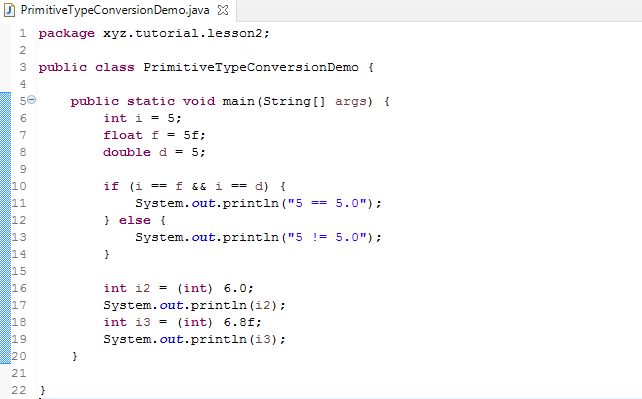
We can append “f” and “d” to specify the type of a number to be float or double. For example: 5f, 5.0d. A number can use ([type]) to convert from one type to another as long as it is allowed. For example: (int) 6.8 will convert a double type number 6.8 to an integer 6. This conversion does not round.
Exercises
- Extends BooleanDemo to print all logical operation results for AND, OR, and negation. (Reference: the logical operation table in section 5)
- Write a new class for exchanging the amount $177.77 to 5 cents coins. How many coins need? How much is the reminder?