
In this chapter, we will learn:
- Local variables and initialization
- Short-form of if statement
- Continue
- Switch
- Inline comments
1. Short-form of if statement
In the last chapter we learned “if -else” structure for conditions. The if – else structure combined with value assignment can be written in a short-form.
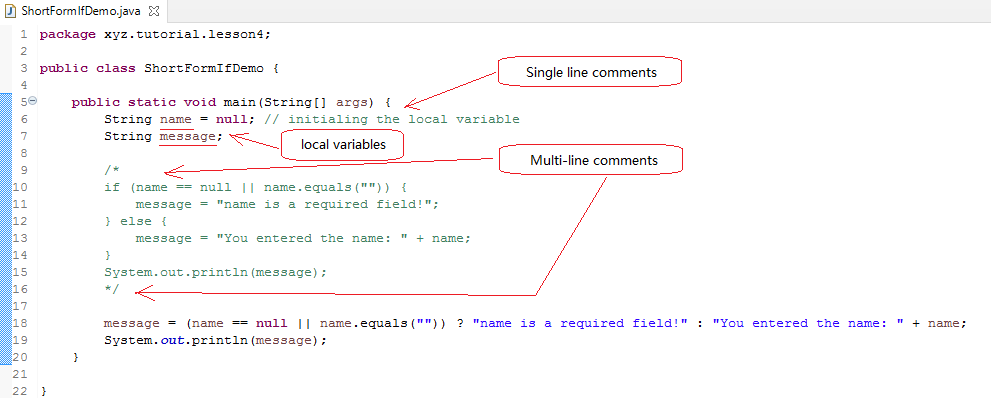
The example includes one regular if-else statement and a short-form conditional statements. Both of them do exactly the same function. The short-form is in the format:
variable = (condition) ? result for true : result for false;
In the short-form, the condition acts the same as that in the regular form. There are two results followed “?” delimited by “:”, The first result is picked if the evaluation of the condition returns true, otherwise the second result will be picked.
in the case of
message = (name == null || name.equals(""))
    ? "name is a required field!"
    : "You entered the name: " + name;
If the evaluation of the condition (name == null || name.equals(“”)) returns true, then the string “name is a required field!” will be assigned to the variable message, otherwise (the evaluation of the condition returns false) the string “You entered the name: ” + name will be assigned to the variable message.
2. Local Variables
With Java, every variable has its access scope. A local variable is a variable declared in a method. A local variable can be accessed only in the method where it is declared. A Java class can have methods and member variables. In Chapter 2, the Car class demonstrate the member variables. The member variables are declared outside of the any methods. We will cover member variable access rules in future chapters.
Since a local variable can only be accessed within the method. before reading values from those variables, variable initialization must be performed. Variable initialization is the process of assigning values to the variables.
In the ShortFormIfDemo example, if the local variable name is declared without assigning any values, it would be considered not initialized, the Java compiler will complain. On the other hand, the local variable message is declared without initialization. It doesn’t have errors. The reason is that the variable will be guaranteed to be assigned a value in either if-else regular condition control structure or in the short-form of if statement. When the program reads the variable in the System.out.println(message);, the variable message has been assigned a value for sure.
3. Inline comments
In the ShortFormIfDemo class, there are 2 types of comments: single line comments and multi-line comments. The comments are the notes to certain pieces of code written in the source code. They don’t affect the program during execution.
The single line comments start with “//”. From “//” to the end of the line is the content of the comments.
Multiple line comments can be marked with “//” at the beginning of the each line just like multiple single line comments. Usually this is a way to temporally disable several lines of code instead of deleting them. (In Eclipse, we can do that by selecting multiple line and press Ctrl+L)
Formal multi-line comments start with “/*” and end with “*/”. The content in the middle will be ignored by a Java compiler.
4. switch
In the last chapter, we learned if-else control structure for conditions. If there are multiple exclusive conditions, then there are multiple “else if” appended for every extra condition and the optional “else” serves the rest cases. Each “else if” represents one branch for a matching condition. If there are many exclusive conditions, Java provides “switch” statement to simply the coding. “switch” statement has its constricts, the purpose of “switch” statement is not to replace the “if – else if -else” structure.
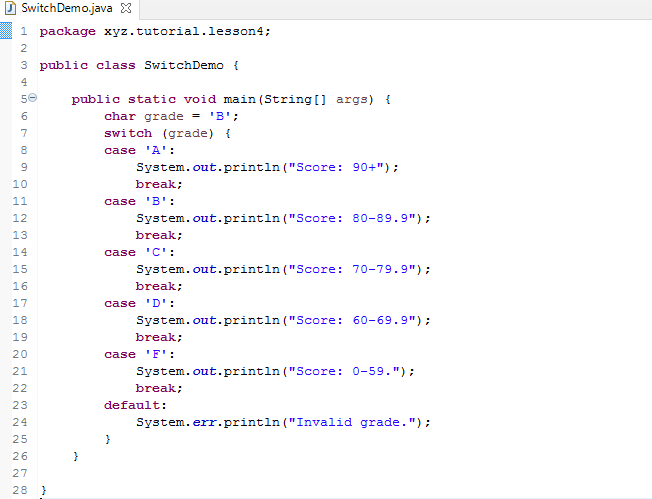
In the SwitchDemo, (grade) is the condition expression. switch statement then uses the result of the condition expression to match each case in the “case” phase. If the (grade) returns the value ‘A’, then case ‘A’ matches. If the (grade) returns the value ‘B’, then case ‘B’ matches. So as the other cases. There is a “default” works as the last resort if there is no matches. It is placed after all cases.
Each case phrase of the switch statement include zero or more statements that fulfills the business logic (business functions) for that specific conditional branch. Usually, just like the example shows that the last statement of each case phrase is a “break” statement. The “break” statement breaks the current switch flow from continuing execution. (Experiment: Comment out or remove the “break” statement at the line 13, run the program and compare the difference between with and without that line. )
In the early version of Java language, the switch statement has a constraint that the condition expression and the data type of each case expression must be one of short, int, or char. The latest version of Java language also support String.
In the SwitchDemo, there are two ways to handle console print out: System.out.println() and System.err.println(). System.out and System.err are the same from the class hierarchy (we will cover hierarchy in the object inheritance). They are usually to indicate normal messages and error messages.
5. char and String
The char type is one of the primitive types. A char value is enclosed with a pair of single quotation mark. A String is enclosed with double quotation marks. A char is fixed 1 byte in length. Even if a String may have only a character that takes 1 byte, it is different to char primitive type.
A char value and a 1-character String can be converted to each other in many ways.
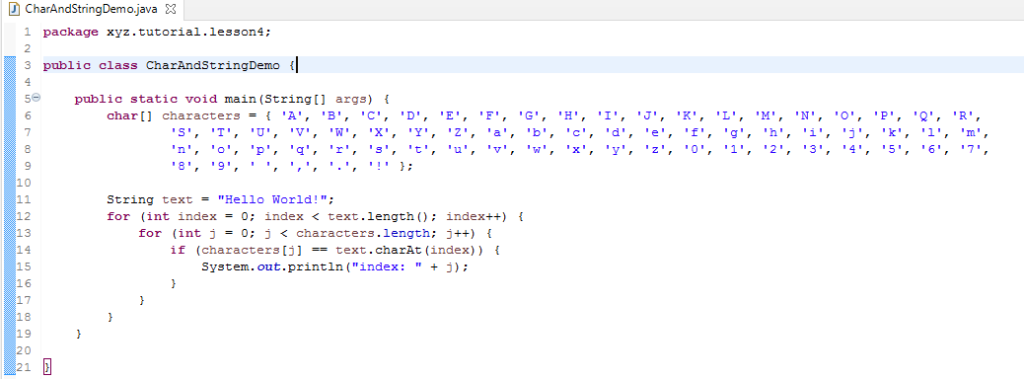
The following example demonstrates a way to read a String character by character into char type, and find the index of that character in a char array.
6. “break” and “continue” statements in loops
In the last chapter, “for”, “while”, and “do” loops all follow their loop conditions, including the start and end conditions. The “break” statement and “continue” statement can change the the regular loop flow.
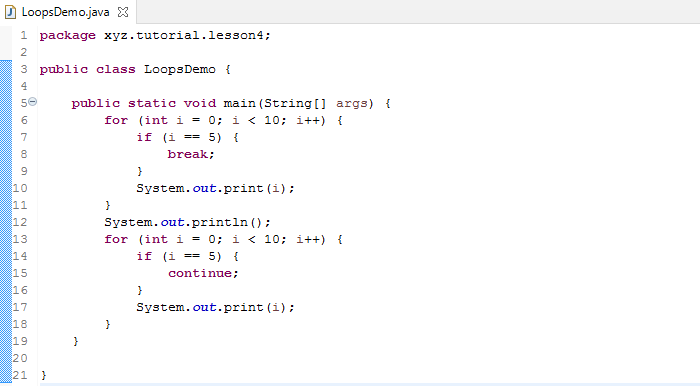
A “break” statement in a loop interrupts the present loop. The rest of loop will not continue.
A “continue” statement in a loop skips the rest lines of code in the present loop and makes it immediately back to the beginning of the loop.
Exercises:
1. Modify SwitchDemo, make the variable grade at the line 6 a String type, and then make other changes accordingly.
2. It was said that Julius Caesar of the Roman Empire invented the data cryptography for communication with frontline generals. The cryptography is called “shift three”. It substitute one letter with another letter that takes 3 letters after in alphabet.
For example, in a alphabet table below
| character | A | … | Z | a | … | z | 0 | … | 0 | ‘ ‘ | , | . | ! |
| index | 0 | … | 25 | 26 | … | 51 | 52 | … | 61 | 62 | 63 | 64 | 65 |
Computer can be encoded into Frpsxwhu
Hello Worlds! can be encoded into Khoor!ZruogC
Write a program to decode a “shift-3” encrypted message Wrn1r!Ro1pslf!5353